Website Chatbots
Answer visitor questions, capture leads and guide them to the right solution.
Learn MoreBuild conversational AI assistants that resolve customer inquiries accurately. Connect LLM APIs, approved business knowledge and human support escalation paths.

From simple FAQ bots to advanced AI assistants, we build solutions tailored to your goals.
Answer visitor questions, capture leads and guide them to the right solution.
Learn MoreHelp customers find products, track orders and recover abandoned carts.
Learn MoreWe focus on practical AI solutions that deliver measurable results for your business.
Tailored to your goals and industry.
Powered by OpenAI, Anthropic, Gemini and more.
Data privacy and enterprise-grade security.
We’re here after launch to help you grow.
Flexible plans for different business needs. Custom solutions available for advanced requirements.
Project based plan selected.
We follow a clear and transparent process to build your AI chatbot with the right strategy, design and integrations.

Understand your goals and use cases
Create, train and integrate the chatbot
Improve with real scenarios
Deploy and provide ongoing support
Answers about scope, integrations, delivery and ownership.
An AI chatbot understands questions in natural language and responds using approved business information. It can also hand a conversation to your team when a person needs to step in.
Common uses include customer support, lead qualification, order updates, appointment booking, internal knowledge search and repetitive back-office tasks.
Yes. Conversation flows, knowledge sources, permissions and handoff rules are designed around your business process and the people who use it.
We connect supported CRM, helpdesk, messaging, payment and internal systems through their available APIs and webhooks.
We agree on the target users, first workflows, knowledge sources, channels, integrations and review criteria during discovery.
The estimate follows the agreed scope, channels, integrations, data preparation and review requirements. You receive a project estimate before development starts.
Ownership and access are agreed in the project terms. The delivered application is prepared for handover with its source code and operating documentation.
We can provide ongoing support for monitoring, fixes, knowledge updates and improvements after launch.
Choose an AI chatbot development company around the assistant’s agreed job, approved knowledge, integration permissions and human handoff. A useful proposal identifies the channel, content owner and acceptance examples alongside the interface.
A custom AI chatbot can retrieve approved business information, collect an enquiry and request an authorized business action. Discovery separates simple FAQ answers from authenticated tools, source citations and support escalation. Model usage, hosting and channel provider charges are reviewed separately.
Choose an AI chatbot development company around the assistant’s agreed job, approved knowledge, integration permissions and human handoff. A useful proposal identifies the channel, content owner and acceptance examples alongside the interface.
A custom AI chatbot can retrieve approved business information, collect an enquiry and request an authorized business action. Discovery separates simple FAQ answers from authenticated tools, source citations and support escalation. Model usage, hosting and channel provider charges are reviewed separately.
See how a business requirement becomes a practical system, with a clear scope and checks your team can review.
AI assistance & connected operations
Automate the routine. Keep people in control.
Fictional scenario name · Proposed implementation · Concept artwork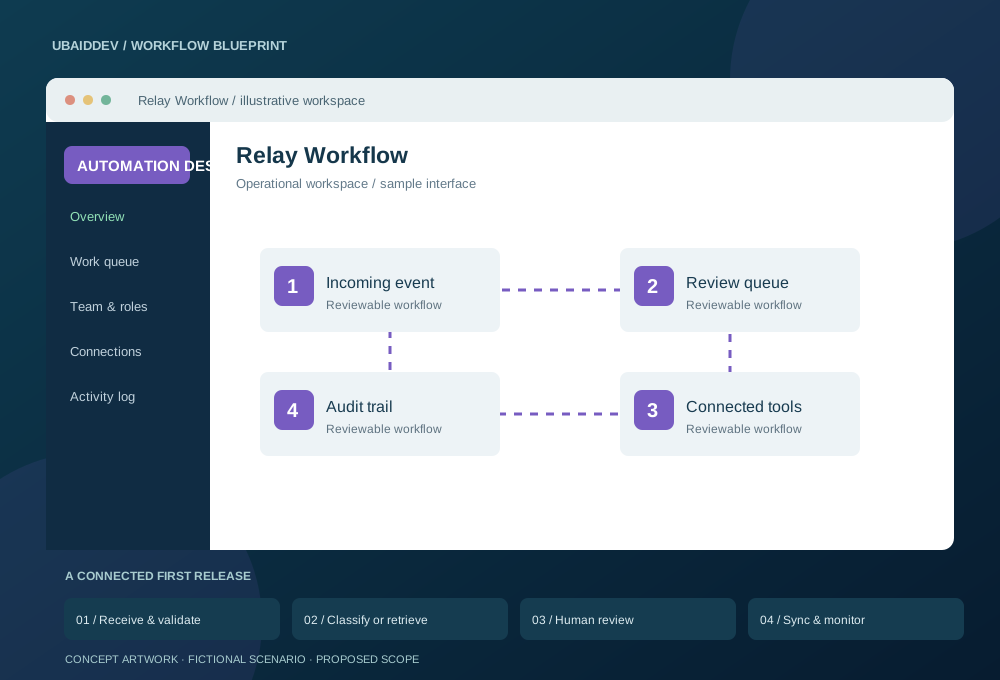
Operations staff copy enquiry details between tools and manually sort incoming documents. Exceptions need human judgement, but repetitive work should not hide the next action.
Use scoped API credentials, deduplication keys and bounded retries. Retrieved answers cite approved documents; uncertain or sensitive actions route to a reviewer. Messaging requires approved templates and appropriate consent.
Track review corrections, failed executions and manual handling time; evaluate AI answers against an agreed reference set.
Targets, baseline, timeline and commercial scope are agreed during discovery.
Agree working-hour overlap, written English updates, staging reviews, migration responsibilities and support scope. Confirm repository access, deployment documentation and ownership terms before work begins.
A useful chatbot needs more than a model connection and a chat window. Your team needs to decide which questions it should answer, which records it can access and how a person takes over. Use this guide to prepare a practical brief, compare proposals and review the delivered system. Each capability below is scoped and tested against your business requirements before launch.
A chatbot’s behavior depends on several changing parts: the application code, the selected model, the retrieval settings, the instructions and the knowledge collection. Record these as a release configuration so an unexpected answer can be traced to the version in use. A content editor should know whether a document change is immediately live or waiting for review. Staff should be able to identify which release produced a conversation under investigation.
Use a review environment for changes that affect important answers or business actions. Run the agreed examples, inspect the differences and document who approved the update. Keep the previous working configuration available for rollback. If a model provider changes behavior or an upstream API changes a field, the same review process helps the team detect the effect before it reaches every visitor. The operating runbook should identify the owner of each dependency and the route for reporting a regression.
Plan how conversations already in progress behave during an update. A user confirming an action should not lose the details they reviewed because a release changed the tool contract halfway through the task. Preserve confirmed state on the server, validate the action again and ask the user to review any changed details. This makes release management part of the customer workflow rather than an invisible technical assumption.
Start with a frequent customer task that has a clear finish: finding an approved policy, checking an order, collecting a sales enquiry or booking an appointment. List the channels, languages and users involved. Give each task a named business owner who can confirm whether the answer and the next step are correct. A focused first release makes it easier to identify missing knowledge and review the conversations that need attention.
Write acceptance examples before choosing a model. Include a straightforward question, a question with missing details, a request outside the service scope and a situation that needs staff approval. Define what a successful handoff contains and where it arrives. Compare the assistant with the current workflow using reviewed examples, rather than promising a fixed reduction in staffing or a guaranteed increase in sales. Agree how results will be checked after launch and who will maintain the examples.
Collect the documents the assistant is allowed to use: product information, support articles, delivery rules, operating instructions and approved service descriptions. Identify the authoritative version of each document and remove duplicate or contradictory copies. Record an owner and review date. If pricing or availability changes frequently, retrieve those values from the system that owns them instead of teaching the assistant to repeat an old document.
During implementation we can split suitable documents into searchable passages and store their references alongside the search index. The answer can point back to the source so a reviewer can inspect the supporting information. Your team needs a process for adding, replacing and withdrawing content. Test that a retired document stops influencing new answers. Permission changes also need to reach the retrieval layer; hiding a page in the interface alone does not protect its indexed content.
Retrieval finds candidate information; it does not prove that a candidate answers the question. The application should check whether useful evidence exists before asking the model to compose an answer. Define what happens when the sources disagree, provide only a partial answer or refer to an outdated offer. In those cases the assistant can ask a clarifying question, explain the limitation or move the conversation to your team.
Review examples containing ambiguous product names, spelling mistakes and questions that combine several requests. For important answers, show a source link or a concise reference that a user can inspect. Avoid treating a confident tone as evidence of correctness. Track whether the retrieved passage actually supports the answer, whether the assistant invents a policy and whether it correctly declines requests outside its responsibilities. Keep the review results tied to a version of the source material and application settings.
An assistant that reads order status needs a different permission set from one that changes an order. Define each tool with an input contract, authorization check and expected response. Resolve the signed-in user on the server and verify ownership of the requested record there. A conversation message must never be enough to grant access to someone else’s customer history, account details or internal notes.
For actions such as creating a support ticket or requesting a booking, show the relevant details for confirmation before committing the change. Use an idempotency reference so retrying a timed-out request does not create duplicate records. Record the tool result separately from the model’s explanation. If the integration fails, the user should see an accurate status and a recovery option. Do not claim that an action succeeded because the model produced text saying that it did.
A website assistant can display richer forms, citations and links within your own interface. A messaging assistant works within the delivery and interaction rules of the selected channel. Confirm ownership of the business account, required provider access, message formats and the process for transferring a conversation to staff. Channel setup, provider approval and messaging charges should be visible in the proposal as separate dependencies.
Decide how a person identifies themselves when moving from a public website question to an account-specific request. Avoid asking for private documents or credentials in an unrestricted conversation. For outbound updates, agree the permitted audience, consent process and message content with the business owner. Test duplicate messages, delivery delays and messages arriving out of order. The application should preserve a clear conversation state and avoid performing the same business action twice when a provider retries delivery.
Specify the conditions for escalation: an explicit request for a person, repeated failed answers, a sensitive topic, missing permissions or a business action that needs approval. Choose the destination, such as a support queue, CRM activity or team inbox. The handoff should include a short factual summary, the user’s stated request and the references staff need to continue. Keep the amount of personal information appropriate to the receiving system.
A useful handoff has an owner and a visible state. Tell the visitor whether a team member is available now or whether the enquiry has been submitted for later review. Define what happens outside operating hours and how an unresolved conversation is followed up. Test that staff can stop automated replies when taking over. A user should not receive contradictory answers from an active agent and the assistant because both believe they own the same conversation.
Build a small evaluation set from representative questions with approved expected behavior. Separate answer correctness, source support, successful tool use and escalation quality. Include requests that should be refused or handed over, not only easy questions. A product owner can review the cases in plain language, while the engineering team uses the same cases to compare changes to retrieval, prompts and application code.
Before release, repeat the evaluation against the exact configuration being deployed. Keep a record of failures and accepted limitations. After launch, sample conversations according to your agreed access and retention rules and add meaningful failures to the review set. A new document or integration change can alter results even when the interface looks unchanged. The handover should explain how to run the checks and how to roll back a change that makes the assistant less reliable.
Treat user messages, uploaded files and retrieved passages as information to examine, rather than instructions that can change the application’s permissions. A document that tells the assistant to reveal internal records must not override the authorization checks on the server. Keep credentials in the application environment and use narrowly scoped integration accounts. Do not place secrets or unrestricted database access in a prompt.
Test attempts to request hidden instructions, bypass approval or redirect a tool to an unexpected destination. Validate tool inputs independently of model output and restrict the operations available to each user. Add reasonable upload limits and review the handling of unsupported file types. Logging should support troubleshooting without casually retaining full private conversations forever. Decide which events need audit records, who can inspect them and how the business will respond when a suspicious interaction is reported.
The build price covers the agreed development work. Running costs can include model requests, document storage, search infrastructure, hosting, channel providers and support. Ask for the assumptions behind any estimate: expected conversations, average message length, document volume and the number of tool calls per task. A short support answer and a long document analysis can have very different resource needs.
Set practical usage limits and a process for reviewing unusually high consumption. Where suitable, straightforward questions can use a smaller workflow or approved static response, while more complex tasks use a model. Test what users see when a provider is unavailable or the usage budget is reached. Your team should receive a clear explanation of which vendor accounts it owns, how invoices are paid and how the application can change providers without losing the surrounding business workflow.
Check that the chat launcher, message history and input work on a narrow screen without covering essential site controls. People should be able to open and close the assistant, move through its controls with a keyboard and understand whether a response is still being prepared. Use readable text, labelled inputs and a visible option to contact the team. Preserve an unfinished message when a recoverable request fails.
Long answers need useful structure and links that can be identified clearly. Test citations, attachments and confirmation actions with realistic content lengths. If the assistant collects an enquiry, validate the required fields and explain the next step before submission. A friendly character or animation can support the experience, but the review should focus on whether the visitor can complete the intended task and recover when the assistant cannot help.
A typical delivery sequence begins with the task map and acceptance examples, continues through knowledge preparation and integration work, and ends with a reviewed pilot. Each milestone should have inspectable output: a workflow diagram, a working retrieval example, a tested business action or a report of evaluation results. Confirm what is included in the first release and what needs a later agreement.
At handover, request the source repository, environment variable inventory, deployment instructions, integration account list and maintenance runbook. The runbook should cover document updates, failed tool calls, provider outages and rollback. Establish who reviews unanswered questions and who approves changes after launch. Support duration and response arrangements belong in the written scope. New channels, additional languages, large content migrations and changes to business processes should be estimated explicitly rather than assumed to be unlimited revisions.
Send a short description of your business, the first task you want automated and the current way your team handles it. Include examples of questions, links to approved public information, the intended channel and the system that owns customer or order records. Explain who will review the content and which actions need a person’s approval. Sanitized examples are sufficient for initial discussion; production credentials and customer records are unnecessary.
Mention any required language, hosting region, support hours or existing technology constraints. If an external provider must approve access, identify who owns that application process. We can use this information to separate a simple FAQ assistant from a retrieval system or an assistant that performs authenticated actions. That distinction helps produce a quote with practical acceptance criteria, visible operating costs and a delivery plan your team can review.
Use these scope options to request a written estimate. The table describes how work is priced; it is not a fixed package or a promise that every listed capability is included.
| Project scope | Work to review | Pricing basis |
|---|---|---|
| Knowledge assistant | Approved content, source references and human handoff | Quote after document and channel review |
| Connected assistant | Authenticated CRM, support or booking tools | Quote after API and permission review |
| Operational support | Usage review, content updates and agreed maintenance | Separate recurring scope and provider costs |
Remote delivery can support teams across India, including Assam, Kolkata, Bengaluru, Mumbai and Delhi NCR. Discovery should identify the languages used by customers and staff, the existing CRM or support tools, and who owns the website or messaging account. We agree working sessions and review checkpoints with your team. These service areas describe remote project coverage and do not represent local offices.
For businesses in the UK, US, UAE and other international markets, agree the operating timezone, support handoff hours and preferred hosting region before implementation. Identify vendor account ownership and any restrictions your organization places on sending data to external providers. Currency, tax treatment, third-party subscriptions and milestone payment terms are confirmed in the written quote. A regional delivery plan does not imply automatic approval from a platform or regulator.
Discuss your workflow with our team or prepare a project estimate. Send an initial enquiry directly; an account is optional.
Get a free consultation and custom quote for your business.