Patient Management
Patient records and visit history
Original illustrative concept preview. Example workflows are discussed and confirmed during project scoping.
Manage patient, appointment, department and billing workflows in one access-controlled workspace.
Patient records and visit history
Online and in-person booking
Invoices, TPA and insurance support
OPD, IPD, pharmacy, lab and more
For teams comparing hospital opd token queue and pharmacy billing software one time cost or hospital management software without monthly per doctor fee, the delivery model is a custom milestone build with agreed source and intellectual-property handover. The exact rights, third-party code, data ownership, hosting, maintenance, upgrades and support are written into the project agreement; $0 per-doctor licence fees do not make hosting or ongoing operations free.
| Decision area | Custom milestone build | Yearly or per-doctor cloud SaaS |
|---|---|---|
| Licence model | $0 per-doctor licence fee under the agreed custom-build scope; milestone payments fund implementation. | Provider billing may use annual, per-doctor, per-site or tiered recurring fees; review the current contract. |
| Source and IP | Custom deliverables and handover rights are specified in the signed agreement. | Product source and platform roadmap typically remain controlled by the vendor; confirm contract terms. |
| Operations | Hosting, backups, security operations, support, upgrades and integrations are separately scoped. | Hosting and product updates may be bundled; service limits, exports and add-ons vary by plan. |
| Best fit | Facilities that need documented workflows, interfaces and control over an agreed deployment. | Facilities whose needs fit the vendor's supported modules and contract. |
An opd queue management software waiting room tv & whatsapp token link workflow can issue a short-lived queue reference, show the current token on a waiting-room display, and announce the next patient through a configured voice device. Keep names and clinical details off public screens and message previews. WhatsApp delivery requires the facility's approved account, consent and template rules; a message link reports queue status but does not guarantee a consultation time.
The 1-screen doctor digital e-prescription & whatsapp rx software workflow can bring the encounter, diagnosis, medication selection, review and signed prescription into a compact clinician view; clinical content remains authored and approved by the treating professional. The abdm abha qr code scan patient registration software india flow is designed around the applicable ABDM API, patient consent, facility onboarding and access approval. ABDM's current FHIR R4 implementation guide defines Indian health-data exchange profiles; HL7 v2 and other interfaces are mapped to the facility's selected systems.
The search phrase “hipaa compliant custom emr software aes-256 fhir r4 hl7 v2 api” describes buyer requirements, not a certification claim. Discovery records the agreed HIPAA-aligned controls, including AES-256 encryption, RBAC, unique user access and audit logs, with encryption decisions tied to the covered entity's documented risk analysis and deployment. UbaidDev does not claim HIPAA certification or guarantee regulatory compliance; contracts, policies, physical safeguards, incident response and business-associate obligations also matter.
A hospital pharmacy fefo expiry alert and gst billing software scope can track batch, expiry, dispensing and reversal records with tax fields configured by the facility's finance owner. Pathology lab barcode specimen tracking & whatsapp pdf report lis workflows can connect collection, accessioning, status and result delivery; lab equipment formats and patient consent for messaging are confirmed in discovery.
The ipd bed occupancy, nursing station, operation theatre ot & tpa insurance claim tracker can coordinate bed state, nursing tasks, procedure schedules, documents and claim milestones. TPA and insurer interfaces vary by payer and region, so supported formats and status updates are validated with the facility. Scope can cover multi-specialty hospital (50 to 500 bed), dental, eye/lasik, ivf fertility, orthopedic, pediatric, dermatology, dialysis & ayurveda clinic custom emr workflows.
For an offline local lan hospital opd billing fallback with automatic cloud sync, local transactions can queue on approved devices and synchronize after a connection returns. Facilities define which records may be stored locally, encryption/key handling, duplicate prevention and conflict review; no cloud update occurs while disconnected.
Remote project coverage can include Guwahati/Assam and Northeast nursing homes, Kolkata and West Bengal hospitals, Bangalore, Chennai, Vellore, Hyderabad, Mumbai, Pune, Delhi NCR, Patna, Ranchi, Lucknow, Varanasi, Jaipur, Indore and Kochi, plus US (HIPAA), UK (private clinics), UAE Dubai (DHA NABIDH / Riayati) and Saudi Arabia (NPHIES / Seha) project requirements. These are remote service areas, not local-office or regulator-approval claims. Jurisdiction-specific onboarding, credentials, data residency, interfaces and operational responsibilities are confirmed with each facility. References: HHS HIPAA Security Rule safeguards, ABDM FHIR R4 implementation guide and HL7 FHIR R4.
Illustrative interface concept using sample data; no live patient records are shown.
Workflow scope is adapted to the facility types and departments confirmed during discovery.
Plan access, integrations and handover around your clinical and administrative workflows.
Get a Free QuoteA simple process to get your hospital management system.
We learn about your hospital and requirements.
We tailor the system to your care workflows.
We build, integrate and test with your data.
We train your team and support go-live.

Technology that works around your care teams.
Map roles, departments and handoffs with the facility team.
Fits clinics to large hospitals.
Safeguards and evidence are agreed for each deployment.
Updates and maintenance for your team.
A hospital opd token queue and pharmacy billing software one time cost proposal should name the registration, queue display, dispensing and finance workflows being delivered. Review barcode devices, batch and expiry records, reversals, staff permissions and migration samples with the facility’s owners before agreeing milestones.
Hospital management software without monthly per doctor fee means the agreed custom build does not carry an additional UbaidDev seat licence for each doctor. Hosting, messaging providers, hardware, support and future changes remain separately scoped. The facility reviews access rules and operating responsibilities before rollout.
See how a business requirement becomes a practical system, with a clear scope and checks your team can review.
Healthcare & appointment operations
Connect appointments without losing the access trail.
Fictional scenario name · Proposed implementation · Concept artwork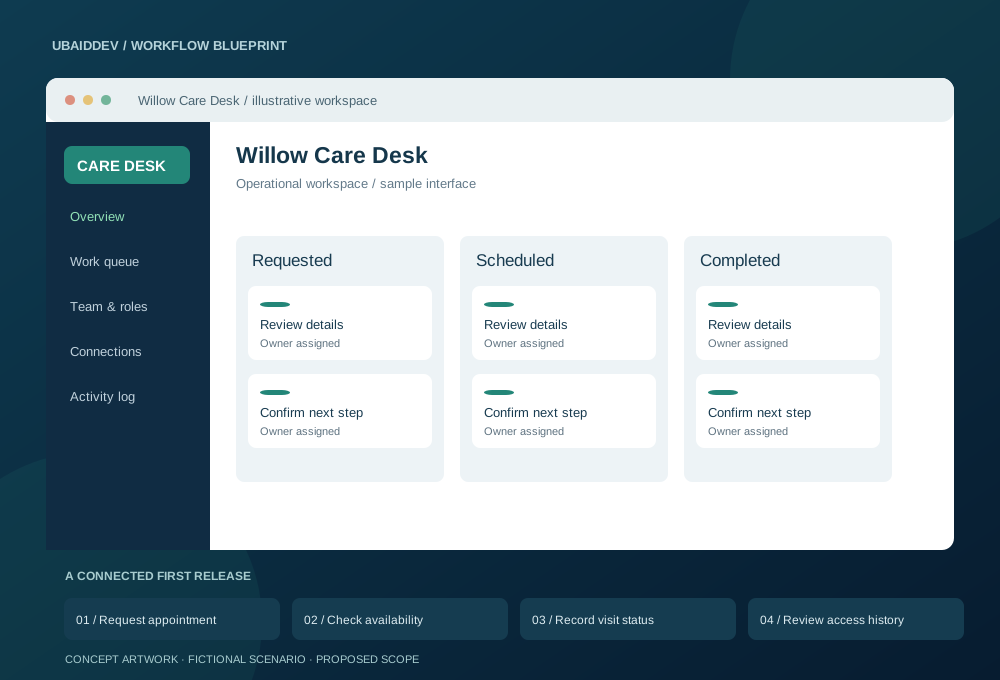
A care provider needs appointments, front-desk handovers and controlled record access in one workflow. Sensitive information requires agreed handling and retention rules.
Prevent concurrent double bookings, scope access by role and record sensitive actions. Confirm jurisdiction, hosting, retention and any regulatory obligations with the buyer before design approval.
Track scheduling conflicts, administrative handling time and appointment completion; no clinical outcome is implied.
Targets, baseline, timeline and commercial scope are agreed during discovery.
Agree working-hour overlap, written English updates, staging reviews, migration responsibilities and support scope. Confirm repository access, deployment documentation and ownership terms before work begins.
Hospital software should follow the work of the facility, from registration and billing through departments and discharge. A successful implementation needs defined record ownership, accountable staff and a plan for exceptions. The following guide explains the decisions to make with your clinical, administrative and finance owners before development. Features are included only when documented in the accepted project scope.
Begin with a representative visit and follow it through registration, queue assignment, consultation, investigation, dispensing and payment. Record which team creates each record and which team relies on it. Include walk-ins, scheduled visits, follow-up appointments and cancellations. The purpose is to expose gaps between departments before those gaps become software defects. Staff who operate the current process should review the map alongside the project owner.
For inpatient scope, add admission, bed transfers, nursing tasks, procedures and discharge coordination. Separate a clinical decision from an administrative status update. Agree the information required at each step and the permissions needed to change it. The first release can cover a defined department or visit type while other workflows remain outside the initial rollout. A smaller reviewed release is easier to reconcile against the facility’s existing records.
Agree which identifier the facility uses across registration, billing, laboratory and pharmacy workflows. Decide how staff search for an existing patient and what happens when names, phone numbers or demographic details differ. Similar names should lead to a review process rather than automatic record merging. A mistaken merge can attach activity to the wrong person, so the software needs a documented way to investigate and correct it.
Migration planning should distinguish patient identity from individual visits and financial transactions. Keep the original source reference for imported records and review a representative sample before approval. Changes to demographic details need an audit history that authorized staff can inspect. Test repeat visits, missing contact details and duplicate imports. The acceptance review should show that the correct records remain connected after a merge, reversal or correction.
Ask finance staff to define price lists, discounts, deposits, refunds, outstanding balances and approval rules. The application should distinguish a draft bill from an issued invoice and a recorded payment from a verified settlement. Avoid silently editing historical amounts when a tariff changes. Corrections need a reason and a traceable adjustment so the day’s totals can be explained without relying on a developer.
Test a cancelled investigation, a partial payment, a returned item and a payment recorded against the wrong visit. The system should preserve the relationship between the original transaction and its correction. Configure tax fields and invoice formats from requirements approved by the facility’s finance owner. Reconcile totals at the shift or day boundary using the reports the team actually needs, including transactions that are pending or reversed.
A laboratory workflow needs to distinguish the requested test, the collected specimen and the authorized result. Define the accession or barcode reference and the points where staff confirm collection, receipt and processing. Record when a specimen is unsuitable or needs recollection. The software should make those exceptions visible to the appropriate team instead of treating every request as an uninterrupted path to a completed report.
Instrument and external laboratory integrations require a sample format, access to a test environment and an agreed owner for field mapping. Review units, reference ranges and result status with the laboratory team. A preliminary result should not appear as a final authorized report. Test duplicate messages, corrected results and unavailable equipment. Delivery of a report through a portal or message link requires its own access and expiry rules.
Inventory records should identify the item, batch, expiry, storage location and quantity available for dispensing. Agree how purchases, transfers, dispensing and returns affect stock. Where expiry-aware selection is required, show staff which batch is proposed and provide an authorized exception process. Item names alone are insufficient when different strengths, formulations or pack sizes need to remain separate in the catalogue.
Review the relationship between a prescription request, the quantity actually dispensed and the billed amount. Test partial dispensing, a returned pack, a damaged item and an expired batch. A return should not place unsuitable stock back into general availability automatically. Opening balances, stock counts and adjustments need a recorded reason and responsible user. Reconcile pharmacy movement reports with the financial view agreed by the facility.
List the tasks performed by reception, clinicians, nursing, laboratory, pharmacy, accounts and administrators. Convert those tasks into access rules for records and actions. A user who can register a visit does not automatically need to export a full record history. Avoid shared staff accounts where individual accountability is required. Review how temporary users, staff transfers and account removal are handled.
Record sensitive actions such as exports, permission changes, financial adjustments and edits to authorized records according to the facility’s requirements. Audit records need a practical review interface and a retention decision. Test attempts to open records through a direct URL or API request with insufficient access. The project should document technical controls and operational responsibilities; a software feature list alone does not establish regulatory compliance for a facility.
Inventory the spreadsheets, existing applications and document stores that contain records to be moved. Identify who can authorize exports and explain the fields. Define which historical records need to be searchable in the new system and which can remain in an approved archive. Agree a cutover date and rules for records created while the migration is being prepared.
Run a trial import into a review environment using an agreed sample. Compare record counts and important financial totals, then inspect individual examples with staff. Report rejected rows and transformations rather than silently dropping difficult records. Keep source files protected and document how temporary copies are removed. The final migration should follow the rehearsed procedure and include a rollback or contingency decision before the old workflow is retired.
The facility should decide how registration, care documentation and payment recording continue when an application or network connection is unavailable. That decision determines whether the project needs a local service, an offline queue or an approved manual fallback. Specify which devices may retain records locally and how staff identify transactions awaiting synchronization. Offline capability requires explicit design and testing.
Backups are useful only when restoration works. Agree the recovery objectives with the facility and test a restore into a separate environment. Verify that restored records, attachments and access settings remain consistent. For queued updates, test duplicate prevention and conflicts when connectivity returns. Staff need a short runbook that identifies the incident owner, the temporary operating procedure and the checks required before normal use resumes.
Choose a pilot group and a limited workflow that staff can compare with their current process. Provide practice accounts and realistic sample data without relying on live patient records for demonstrations. Each role should complete its own acceptance scenarios, including common mistakes and recovery steps. Record the person responsible for approving each workflow and the issues that must be resolved before wider rollout.
Training should cover ordinary work and exceptions: correcting an identifier, reversing a charge, finding a failed integration and reporting an access problem. Schedule the rollout around the facility’s operating constraints and identify who can make a go-live decision. Keep support contacts and escalation responsibilities clear. A successful technical deployment is one checkpoint; staff readiness and reconciled records are also required before an old process is switched off.
The delivery agreement should name the owner of the repository, hosting account, domain, backups and integration credentials. Ask for deployment instructions, a configuration inventory and a runbook for routine operational checks. Confirm how updates are reviewed and who approves production access. The facility should understand how to export its records and restore service without depending on an undocumented development machine.
A one-time software build and the ongoing operation of the system are separate budget items. Hosting, message delivery, external interfaces, hardware, support and future modules may carry additional costs. Define the support period, issue reporting process and scope of maintenance in writing. New departments, insurer interfaces or migration sources should be reviewed as scope changes with their own acceptance checks and delivery estimate.
Bring the registration lead, a clinical workflow owner, finance, pharmacy or laboratory representatives where relevant, and the person responsible for the existing IT environment. A joint workshop can resolve conflicts between department requirements before development starts. Use blank forms, sanitized reports and sample transactions to explain the process. Initial discovery does not require production patient records or credentials to a live hospital system.
Identify the person who can approve each workflow and the dates when staff can review a demonstration. List dependencies such as access to an existing vendor, equipment documentation or a required hosting decision. Agree how decisions and changes will be recorded. This preparation helps distinguish a focused OPD project from a broader hospital rollout and produces a more useful estimate of migration, integration and staff training work.
Use these scope options to request a written estimate. The table describes how work is priced; it is not a fixed package or a promise that every listed capability is included.
| Project scope | Work to review | Pricing basis |
|---|---|---|
| OPD and clinic rollout | Registration, queue, agreed visit records and billing | Quote after workflow and user review |
| Hospital departments | IPD, pharmacy, laboratory and approved integrations | Quote by department, migration and interfaces |
| Operation and support | Hosting, backups, messages, devices and maintenance | Separate costs confirmed in the proposal |
Remote implementation can support facilities in Assam and Northeast India as well as other Indian regions. Discovery should identify the staff languages, existing registration and finance processes, printers, barcode devices and available network connections. Local invoice and integration requirements need an accountable facility owner. We agree working sessions with the people who will review the workflows; regional coverage does not imply a local office.
For facilities outside India, begin with the required hosting location, permitted support access, working hours and external interface owners. Your organization should identify its applicable policies and review obligations before sharing production records. Third-party onboarding and any required local review are dependencies in the implementation plan. We document the technical scope, test evidence and handover responsibilities without claiming that buying the software automatically establishes regulatory approval.
Discuss your workflow with our team or prepare a project estimate. Send an initial enquiry directly; an account is optional.
Find answers to common questions about our hospital management solution.
We can scope AES-256 encryption at rest, TLS for data in transit, role-based access, unique user identities, and audit logging after reviewing the facility, hosting model, and risk assessment. HIPAA Security Rule encryption decisions are risk-based, and these controls alone do not establish compliance. The facility and its business associates remain responsible for their applicable administrative, physical, and technical safeguards; NABH workflows are mapped to the facility’s applicable standards.
Yes. That is the standard best practice: launching OPD registration, doctor consultation desks, and billing in Phase 1, followed by IPD wards, OT, and pharmacy in subsequent milestones.
Hospital management software without monthly per doctor fee means the agreed custom build does not carry an additional UbaidDev seat licence for each doctor. Hosting, messaging providers, hardware, support and future changes remain separately scoped. The facility reviews access rules and operating responsibilities before rollout.
Yes. We support ASTM and HL7 bidirectional interfacing for clinical biochemistry, hematology, and immunology analyzers so results populate automatically into patient reports without manual typing.
A hospital opd token queue and pharmacy billing software one time cost proposal should name the registration, queue display, dispensing and finance workflows being delivered. Review barcode devices, batch and expiry records, reversals, staff permissions and migration samples with the facility’s owners before agreeing milestones.
Get a customized hospital management system with a clear plan and quote.