A website quote can look simple until you compare two of them. One provider may promise ten pages, another may promise a custom design, and a third may bundle hosting and search setup. They can all call their offer a “business website package” while describing different work.
The useful question is not which package has the most items. It is which one gives your customers a clear path from first visit to enquiry or purchase, and which costs and responsibilities you will still have after launch. This guide gives you a practical way to make that comparison without needing to know how to code.
Start with the job your website needs to do
Before asking a provider for a package, finish this sentence: “A good website should help the right customer ___.” The answer might be understand a specialist service, request an appointment, compare products, book a consultation or place an order. Pick the action that matters most. The structure and functionality should support it.
A local consultant who needs credible service pages and enquiries has a different brief from a retailer who needs product discovery and checkout. A growing company with a sales team may need lead routing or a customer portal. They all need a website, but they should not buy the same scope just because the same package name appears on a pricing page.
Write down the customer, the problem they bring, the decision they need to make and the next step you want them to take. Keep it short. This one-paragraph brief is more useful to a designer than a long list of visual features collected from unrelated websites.
Three common website package shapes
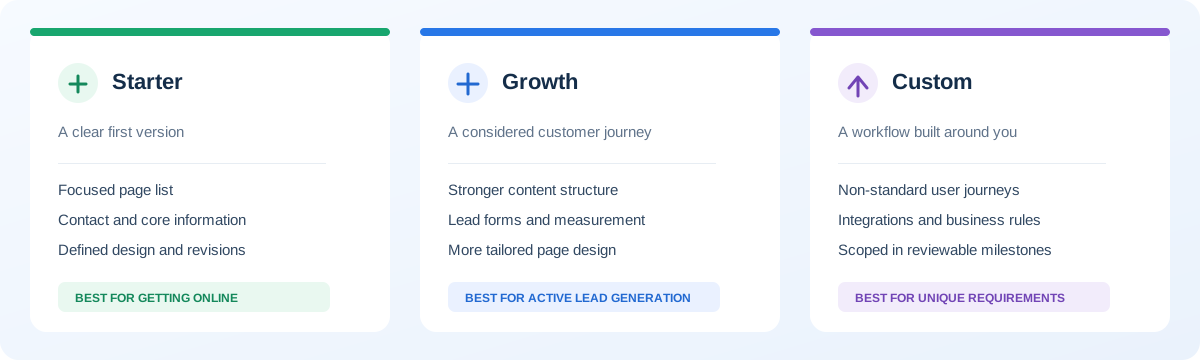
Package names are not standard across the industry, but most offers fall into three practical shapes. Use them as a way to frame the conversation, not as a universal price list.
| Package shape | Best fit | Typical scope question | What to plan next |
|---|---|---|---|
| Starter | A focused first website | Which pages, copy and revision rounds are included? | Who will keep content and contact details current? |
| Growth | A site that actively supports lead generation | What content, measurement and conversion work is included? | Who reviews enquiry quality and page performance? |
| Custom | A workflow that standard pages cannot handle | Which user roles, integrations and acceptance steps are in scope? | Who owns the systems and maintenance after launch? |
Starter: a clear first version
A starter package suits a new or small business that needs a credible web presence, a focused page set and a direct way for customers to get in touch. It usually relies on a defined layout or tightly limited design choices. The benefit is a small, predictable scope. The trade-off is that unusual workflows and extensive revisions may sit outside the offer.
This can be the right choice when your business model is clear, your content is ready and your immediate goal is to be easy to find and contact. It is not a shortcut to a custom booking platform, product catalogue or complex brand experience. Check what the package means by “up to ten pages,” whether you supply the text, and whether images or edits cost extra.
Growth: a more considered customer journey
A growth website tends to include more work on information structure, brand consistency and lead generation. The provider may shape page layouts around customer questions, create more tailored calls to action, connect analytics or improve existing content. It is a fit when the website is already part of how the business attracts and converts customers, rather than simply an online address.
Ask what is being designed from scratch and what uses a template. Ask whether the provider will help plan the content or only place copy you supply. If the package promises “conversion optimization,” find out whether that means a specific review and recommendation or ongoing experiments after launch.
Custom: functionality shaped around your process
A custom package is for requirements that cannot be handled well by a standard set of pages. Examples include a customer area, staff dashboard, complex product configuration, appointment rules, quoting workflow, integrations with business systems or permission-based content. The project needs discovery because those details change the design, architecture, delivery plan and maintenance needs.
Custom does not mean adding complexity for its own sake. A good provider should explain which requirements truly need custom development and which can be handled by a proven service or a simpler setup. If every part is described as “bespoke” but the proposal never names the user roles, data flows or acceptance criteria, the scope is not clear enough yet.
Compare the scope, not the label
Ask each provider to describe the deliverables in plain language. A package name gives you almost no basis for comparison. A written scope lets you see whether the proposal covers the work you expect and makes exclusions visible before you pay.
Start with the page list and purpose of each page. “Ten pages included” sounds precise, but a page could mean a reusable template, a unique layout, or a URL with minimal content. Ask how service pages, locations, product pages and policy pages are counted. Confirm who supplies the page copy and who enters it into the site.
Next, check the design process. Does the provider show a wireframe or visual direction before building? How many rounds of feedback are included? Who consolidates comments from your team? A clear review process protects both sides from a launch date being stretched by feedback arriving in small pieces.
Finally, review functionality line by line. “Contact form” should say where enquiries go, which fields it collects and whether a confirmation message is included. “Booking” should specify the rules, calendars and notifications. “E-commerce” should say which payment, shipping, tax and catalogue needs are covered. If a phrase could mean several things, ask for an example.
Choose pages that help customers decide
Do not fill a page quota just to use every page in a package. Start with the questions customers ask before they contact you. A professional services firm might need a focused home page, a page for each major service, proof of experience, answers to common concerns and a contact route. A shop needs product categories and useful product information. A clinic needs clear service details and appointment instructions.
Each page should have one main purpose. A service page can explain who the service is for, what problem it solves, what working together involves and what to do next. An about page should help a visitor judge whether your team understands their situation. A contact page should offer a convenient route and set expectations about what happens after someone reaches out.
When two pages would say nearly the same thing, combine them or give them distinct roles. Thin pages added only to make the site look bigger create more editing work and can confuse visitors. Add a page when it serves a distinct audience, offer, location or decision—not because the package includes a particular number.
Mobile usability and accessibility are basic requirements
Customers may arrive from a phone, a map listing, a shared link or a desktop search. Ask to see the design at narrow and wide screen sizes. Navigation, text, buttons and forms need to remain understandable and usable without horizontal scrolling. A desktop screenshot alone cannot show whether the experience holds together on a phone.
Check practical details: Can someone tap the phone number? Can they complete the form with one hand? Does the page keep its layout when images load? Are important actions easy to distinguish? Is the text readable against its background? These are design questions as much as engineering questions.
Accessibility also improves day-to-day usability. Ask whether pages use meaningful headings, labels for form fields, keyboard-accessible controls, visible focus states and descriptive text for informative images. No short checklist proves full compliance with every accessibility law, but these basics should be part of a professional process rather than treated as a paid luxury.
What “SEO included” should actually mean
SEO is an overloaded phrase in website proposals. It may mean a title tag is filled in, or it may mean research, content planning, technical implementation and ongoing measurement. Ask for a list of deliverables instead of relying on the label.
For a new or redesigned site, technical foundations can include crawlable pages, descriptive page titles, clear headings, useful internal links, mobile-friendly rendering, sensible image sizes and alt text where an image communicates information. Your site should also have a canonical URL strategy, sitemap and redirect plan when existing URLs change. The right details depend on how the site is built and what content it contains.
Keyword research is a separate decision. Pick topics that match the services and questions your actual customers bring. In Google Ads Keyword Planner, the low, medium or high competition label describes advertiser competition for the selected market; it is not an organic ranking difficulty score. Its search estimates and top-of-page bid ranges also depend on location and network settings. Check the Keyword Planner metric definitions, then use Search Console or a dedicated SEO tool to assess organic visibility and competing pages. A phrase with high ad bids is not automatically the right organic target; judge it against buyer intent and fit.
Be wary of promises to guarantee first place or a fixed number of leads from a website package. A developer can control the implementation, but search results and customer decisions depend on factors outside the build. A credible proposal will describe the work it will do and how you can measure it, without promising a ranking it cannot control.
Decide who writes copy and supplies images
Text and images are often the hidden dependency in a website project. If you supply them, the work moves fastest when the content is approved and organized before design begins. If the provider writes them, ask how many pages are included, who fact-checks the claims and how many review rounds are available.
Do not publish generic claims such as “industry-leading,” “guaranteed results” or invented client outcomes just to make a page feel complete. Explain your real process, service limits and evidence. Customer quotes and case studies should be accurate and used with permission. Trustworthy specifics persuade better than impressive-sounding claims that a buyer cannot verify.
For every image, establish whether it is original, licensed stock, supplied by you or generated. Confirm that the licence covers commercial use and that important images will have useful alternative text. Decorative images can be hidden from assistive technology; informative images should be described in context. Keep original files and make sure you can replace or update them later.
Forms, integrations and measurement
A website enquiry form is only useful if the message reaches the right person and the customer understands that it worked. Ask who receives submissions, what happens if delivery fails, whether spam protection is included and whether the form stores personal data. The simplest option that fits the need is often best.
List each system the website must connect to: email marketing, a CRM, payment provider, calendar, inventory tool or analytics service. For each one, specify what information moves, in which direction and when. “CRM integration” is not a complete requirement. A provider needs to know which CRM, fields, triggers and error cases are in scope.
Analytics should answer a business question. If you want to know which pages lead to qualified enquiries, agree on how an enquiry is counted and whether consent or privacy settings affect tracking. Do not collect data simply because a script can do it. Keep access credentials in accounts you control and record who can see the data.
Speed, security and the work after launch
Ask how the site will be tested before launch: at common screen widths, in current browsers, through its main forms and on real content. A provider should be able to explain image optimization, caching and the technology choices that affect page delivery. One lighthouse score taken once is not a substitute for testing the customer journey.
Security is shared work. The proposal should name who manages software updates, backups, access permissions and recovery if something breaks. Strong passwords and multi-factor authentication matter, but so do secure form handling, limited admin access and keeping software dependencies maintained. Ask what is included during the initial support period and what becomes a paid maintenance plan.
Maintenance is not always a monthly retainer. You may operate a simple site yourself, arrange help as needed or pay a provider to monitor and update it. What matters is that someone owns the responsibility. Confirm how hosting, domain renewal, paid plugins, SSL certificates and third-party services are billed so a one-time quote does not hide recurring costs.
Ownership and handover should be written down
Register your domain in an account your business controls. Whenever possible, keep hosting, analytics, payment and email accounts under business ownership too. A provider can have delegated access to do the work without becoming the only person who can recover those accounts.
Ask what you receive at handover: website files or source code, access credentials, licensed assets, copy documents, design files, a backup, and instructions for routine edits. “Full ownership” can mean different things, especially where a site uses commercial themes, fonts or software. The contract should distinguish the work created for you from third-party components with their own licences.
Good handover is also a test of whether the site is maintainable. Someone at your business should know where to edit a phone number, add a staff member, update a service or change a photo. If every small edit requires the original developer, ask why and decide whether that dependency is acceptable to you.
Understand the full cost, not just the headline
There is no single dependable price for a business website because the scope varies. A fixed-price package can be useful when it clearly defines a repeatable result. A custom quote can be more appropriate when your requirements depend on integrations, original content, data migration or unusual functionality. Compare like with like before deciding that one is expensive and another is affordable.
Separate one-time project costs from ongoing operating costs. The initial project could include planning, design, development, content entry, migration and launch. Recurring costs can include hosting, domain renewal, email, paid software, maintenance and marketing. Some are billed annually, some monthly, and some only when you request additional work.
Ask whether taxes, payment processing, premium assets, content writing and third-party subscriptions are included. Find out how scope changes are priced. If the package says “unlimited revisions,” ask what counts as a revision and whether changes to the approved brief are included. Specific terms are more useful than a promise that sounds generous but has no boundary.
UbaidDev currently publishes a defined $50 ten-page starter website offer, with optional SEO setup priced separately. That is a specific entry-level package, not a benchmark for every business website. Its fit depends on whether the published pages, process and add-ons match your needs. For a larger custom project, request a scope-based estimate instead of assuming a starter package covers it.
A fair way to compare proposals
Give every provider the same short brief. Include the business goal, audience, services or products, likely page list, required actions, existing website and the systems that must connect. Mention your launch window and a budget range if you have one. It is fine to say which decisions are still open.
Then compare each response in a simple table: included pages and layouts; custom design; writing and image work; forms and integrations; SEO and analytics; mobile and accessibility checks; review rounds; launch and migration; ownership and handover; support; one-time price; recurring costs. Write “not specified” wherever the proposal is silent.
Ask the provider to walk you through the parts you do not understand. A good partner can explain the trade-offs without making you feel uninformed. Ask what they would remove if you needed to lower the first-phase budget, and what they would keep because it protects the main business goal. This reveals more about their judgment than another list of technologies.
Questions to ask before signing
- Which deliverables and page layouts are included, and what is explicitly excluded?
- Who writes, edits and approves the website text and sources the images?
- How many review rounds are included, and who consolidates feedback?
- Which forms, integrations and tracking events will be implemented?
- Who owns the domain, hosting, content, design files and source code?
- What recurring fees will I pay after launch, and to whom?
- What support is included, for how long, and how are new requests priced?
- What happens if the launch date moves or either side needs to pause?
These are ordinary project questions, not signs that you distrust a provider. Clear answers early reduce misunderstandings later and give both sides a shared definition of finished.
Common buying mistakes to avoid
Choosing by page count alone. Ten empty pages are less useful than five pages that answer customer questions and guide a decision. Check the purpose and content of each page.
Comparing totals without exclusions. A lower quote may not include copy, migration, analytics, hosting or the integration you need. Add those costs before deciding.
Leaving content until the end. Late copy and missing product details cause rushed layouts and launch delays. Assign an owner and a delivery date for every content item.
Expecting the website to create demand by itself. A well-built site supports marketing and sales; it does not replace a clear offer, useful content, customer service or a plan to reach buyers.
Ignoring who maintains the site. Every site needs an owner for renewals, updates and access. Agree on that role before launch.
Paying for complexity you cannot explain. A customer portal or custom dashboard may be valuable, but only if it solves a real workflow problem. Start with the smallest release that proves the need.
Which package is right for you?
Choose a starter package when the offer is established, the required pages are straightforward and a defined layout meets the customer need. Choose a growth-focused project when your website is a meaningful source of leads and needs stronger content structure, a more tailored design or better measurement. Choose custom development when customers or staff must complete workflows that ordinary pages and standard tools cannot handle well.
If you cannot decide, do not guess at a feature list. Describe the customer journey and ask a provider to recommend the smallest sensible first version. A trustworthy recommendation may be a standard product, a simple website, a phased custom build or no project at all yet. The purpose of the conversation is to clarify fit before money and time are committed.
When you review a proposal, you should be able to explain what you are buying, what success looks like, what it will cost to operate and what you will control at handover. If you cannot answer those questions, ask for a clearer scope. That is usually the fastest route to choosing well.
Plan your next step
Write a one-page brief with your primary business goal, audience, must-have pages, required forms or integrations and the person who will approve the work. Mark each item as “required for launch,” “useful later” or “not sure.” That turns a vague redesign idea into a conversation a provider can respond to.
If a defined starter site matches your needs, review the published website package and inclusions. If your requirements involve custom layouts or connected workflows, explore website development services or use the project estimate to start outlining scope. Bring your questions; you do not need a finished technical specification to begin.